
What Are the Freeola Payment Options?

I often see people asking what are the Freeola payment options and, more importantly, whether those options are reliable in real-world use. As someone reviewing UK web hosting and domain providers, I wanted to look beyond marketing pages and focus on how Freeola payments actually work day to day.
In this article, I explain the available payment methods, how secure the system is, and where users frequently run into problems. I also draw directly from real Trustpilot reviews to highlight genuine experiences rather than theory.
In short, Freeola offers standard UK-friendly payment methods, but there are practical limitations users should understand before committing.
At a glance, this article covers:
- The payment methods Freeola currently supports
- How secure Freeola’s online payment system is
- Common complaints about failed payments and renewals
- Real customer experiences with billing and support
- My final verdict on whether Freeola payments are fit for purpose
For a full breakdown of Freeola’s payments, reliability, and real customer feedback, see our full Freeola review below.
What Payment Methods Does Freeola Currently Accept?
Freeola offers a limited but straightforward set of payment options for customers managing hosting and related services. Payments are handled through the MyFreeola control panel, where users can securely add, update, or remove their payment details as needed.
Currently, Freeola accepts:
- Visa and MasterCard debit or credit cards
- Direct Debit for ongoing or recurring services
- Phone payments in certain situations as a backup option
While these methods cover basic needs, Freeola does not currently support newer or more flexible options such as PayPal, Apple Pay, or Google Pay. This may be a drawback for users who prefer added convenience or international payment alternatives.
Can You Trust Freeola’s Online Payment System?
Security is one of Freeola’s strengths. Transactions are encrypted, and all billing information is stored in a secure environment. The platform uses fraud protection protocols to safeguard customer data and detect suspicious activity. This helps prevent misuse, but it can also complicate the payment process.
Despite this, Freeola’s payment interface feels dated compared to other providers. While it gets the job done, there’s room for improvement in terms of usability and flexibility. For most users, the system works as expected, but it’s not without its hiccups, as we’ll explore further.
Why Doesn’t Freeola Accept More Flexible Payment Options Like PayPal or Apple Pay?
In a world where frictionless payments are expected, Freeola’s limited options feel restrictive. Unlike competitors such as Namecheap or GoDaddy, Freeola does not support PayPal, Apple Pay, or Google Pay, something that could be a deal-breaker for some customers.
This lack of flexibility means:
- No easy way to use business wallets or shared accounts
- Limited options for international users
- Less convenience for mobile-first customers
It’s unclear why these options haven’t been added, especially since even smaller UK-based providers now offer PayPal support. Freeola could increase customer satisfaction significantly by diversifying its payment methods.
Are Freeola Payments Automatically Renewed Even When a Service Is No Longer Used?
One of the biggest criticisms of Freeola is its automatic renewal system. Services such as domain names and hosting are auto-renewed annually, and unless the user takes action to cancel, billing continues, even when the service is no longer active or required.
Here’s a verified Trustpilot review that highlights the issue:
Geoff — 2/5 stars
“After many years of using Freeola (which autocorrects to free load!) I let my domain name lapse as it wasn’t being used. I found out some time later that I was still being billed for this service… be careful that you cancel the payment to them if you stop using their service or they will continue to take your money.”
This reflects a system that assumes continuous use unless manually terminated. It’s critical that users log into their MyFreeola account and actively cancel unwanted services. Otherwise, charges may accumulate, even if the domain or website is inactive.
Why Do Freeola Card Payments Sometimes Fail Without a Clear Explanation?
Payment failures are another common frustration, especially when they happen without clear communication. Anti-fraud measures are necessary, but they must be balanced with user experience.
One reviewer shares:
Daniel Stephens — 1/5 stars
“For the last few years, the card payments have failed (with no explanation)… They told me it’s an anti-fraud thing – my internet address is not in the UK, while the Visa is. That worked fine, the waiting time was short, the staff very nice, payment done. BUT WHY WASTE CUSTOMERS’ TIME WITH SILLY ANTI-FRAUD MEASURES FOR TRIVIAL PAYMENTS?”
This points to a lack of transparency, users only realise there’s a problem after a failed payment, and even then, there’s no error explanation. This can cause service disruptions or missed renewals.
Issue User Impact Freeola’s Response
Card declined due to IP mismatch Delays in service renewal Recommended phone payment
No clear error messaging Confusion, repeated attempts Generic failure messages
Inflexible fallback options Time wasted on support Limited to phone/chat support
Freeola has acknowledged this feedback and claims to have updated their system. However, the lack of upfront communication still appears to be a pain point for many users.
Is It Too Difficult to Update or Change Payment Details on Freeola?
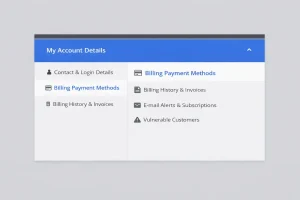
Updating payment methods should be easy, but that’s not always the case with Freeola. Here’s how a reviewer described their experience:
While Freeola provides a guide on updating billing details via MyFreeola, browser compatibility and interface issues can make the process unreliable.
How to Update Payment Info on Freeola?
- Log into your MyFreeola account
- Navigate to Billing Options
- Select Update Payment Details
- Enter new card information or set up Direct Debit
- Confirm changes and save
If this fails, Freeola recommends contacting support, but even that may not guarantee immediate resolution. This is an area where Freeola could greatly improve, both in functionality and user guidance.
What’s My Final Verdict on Freeola’s Payment Options?
Freeola’s payment system does the basics: you can pay by card, set up Direct Debit, and manage everything through a central dashboard. However, the experience isn’t as smooth or modern as you might expect from a UK-based web hosting provider in 2024.
Strengths:
- Secure and encrypted payment system
- Basic payment options work for UK customers
- Responsive support when issues are raised
Weaknesses:
- No PayPal, Apple Pay, or flexible alternatives
- Payment failures due to strict anti-fraud triggers
- Ongoing billing unless manually cancelled
- Browser issues with updating payment details
If you’re a small business owner or casual website user, Freeola might be “good enough”, but only if you’re vigilant about your subscriptions and proactive about payment updates.
For a more flexible experience, especially for international users or mobile-first businesses, there are more user-friendly alternatives available.
