
How Do I Cancel My EasySpace Subscription?

As someone who has personally gone through the tedious process of trying to cancel my EasySpace subscription, I can say this: it’s far more complicated than it needs to be. You’d expect a few clicks and a confirmation email, but instead, you’re met with delays, vague instructions, and sometimes even unexpected charges.
Here’s what you need to know before you start:
- You must manually disable auto-renew to avoid being charged.
- Hosting and domains are cancelled separately.
- You may not receive immediate confirmation.
- EasySpace support is not always responsive.
Let me walk you through what to expect, and avoid.
Why Can’t You Just Cancel EasySpace Without a Hassle?

Many users assume that cancelling a web hosting service like EasySpace should be straightforward. Unfortunately, it rarely is. The control panel isn’t intuitive, and cancellation options are buried under multiple layers of navigation. Even finding where to initiate the process can feel like solving a puzzle.
One of the major frustrations is the absence of a clearly labelled “Cancel Subscription” button. Instead, you’re directed to select individual services and go through different prompts, some of which don’t clearly confirm that cancellation is complete. You’re often left wondering whether the service will still auto-renew or not.
And that’s not just me, online forums like Reddit show numerous complaints from users who thought they’d cancelled but were still billed.
What If You Forget to Disable EasySpace Auto-Renewal?
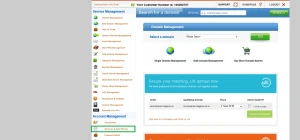
Disabling auto-renewal isn’t just a recommended step, it’s essential. EasySpace is known for renewing services even after cancellation if the renewal toggle isn’t manually switched off. Forgetting this can result in unexpected charges, with little to no advance notice.
Auto-Renewal vs. Manual Cancellation
Aspect Auto-Renew Enabled Auto-Renew Disabled
Charges after cancellation Likely Unlikely
Refund eligibility Limited Higher chance (if in advance)
Cancellation status Unclear Clearly pending or confirmed
Confirmation email Rarely sent Sometimes sent
To highlight just how serious this issue can be, here is a real Trustpilot review, shared exactly as written by the customer:
Jozef Kinder, Sep 14, 2022
Make sure you cancel everything
Moved our domains away due to costs BUT Even though I transferred the domain away the month before, They still took payment from my credit card for a domain that was no longer under their control
They claim it was set to Auto Renew but once you have paid the ridiculous Transfer Away fee the domains in question disappear from your control panel anyway hence unable to change anything relating to it
As such I have had to take this up with my credit card company as an unauthorised payment
I will not be using them again nor would I recommend them
This review reinforces a recurring concern: once a domain is transferred away, it may disappear from your control panel, leaving you unable to disable auto-renewal, yet EasySpace may still process payments. For many users, this lack of visibility and control is what turns a simple cancellation into a serious billing dispute.
Why Long-Standing Customers Expect Better Treatment?

It’s incredibly disheartening when a company you’ve used for years makes it difficult to leave. As a long-time EasySpace user, you might expect a bit more leniency or at least helpful customer service. Sadly, that isn’t always the case.
Many loyal users report that they were bounced between departments, received vague answers about cancellation timelines, or were pressured to stay on through discounts rather than being assisted in closing their accounts. Worse still, support hours are limited to weekdays during business hours, which doesn’t help if you’re working or in a different time zone.
In the end, it feels like EasySpace is more focused on retaining customers through resistance than through quality service. We’ve documented similar experiences from long-term EasySpace customers in our full review.
To illustrate just how poorly some loyal customers have been treated, here’s a real review from a user with two decades of experience using EasySpace:
Liam, Updated Sep 16, 2021
Leopards dont change their spots
Been with easy space for 20 years. Then today got a nasty patronising phone call today giving me threats because I turned off autorenew an cancelled two email domains several months ago. Refused to cancel my services and said my account was in arrears. Contradicted me, interrupted me, and ignored me. Appalling customer treatment.
Can You Really Trust That Your EasySpace Account Is Cancelled?
The short answer? Not entirely. Even after completing the cancellation steps, many users never receive a clear confirmation. Emails often go unanswered, and no final receipt or proof of closure is issued unless you actively chase support. This leaves customers in limbo, unsure whether their account is truly closed or still exposed to future charges.
Many people assume cancelling hosting ends everything. In reality, domains can remain active and continue auto-renewing, quietly adding costs in the background.
Communication is another weak point. EasySpace rarely confirms successful cancellations, forcing users to repeatedly log in just to check service status.
To double-check your account:
- Log into your control panel
- Review all active, pending, and renewal services
The process is unnecessarily frustrating and avoidable
Isn’t It Frustrating That Cancelling Hosting Doesn’t Cancel Your Domain?
Yes, extremely. One of the most misleading parts of EasySpace’s process is how it separates hosting and domain services. If you think cancelling your hosting package will automatically stop domain renewals, you’re in for a nasty surprise. These services are handled independently, and failure to cancel both could lead to continued billing.
Here’s what makes it even more annoying:
- You need to request an EPP code to transfer your domain.
- This process isn’t automated, it requires a support request.
- Domains can renew without your explicit permission if auto-renew is on.
Hosting Cancellation vs. Domain Management
Action Hosting Domain
Auto-cancellation available? Yes (if done manually) No
Requires EPP/Auth code? No Yes
Confirmation sent? Rarely Only after domain transfer
Auto-renewal toggle? Must disable manually Must disable separately
If you don’t handle the domain separately, it will remain under EasySpace’s control, and on your bill.
How I Finally Managed to Cancel My EasySpace Subscription?
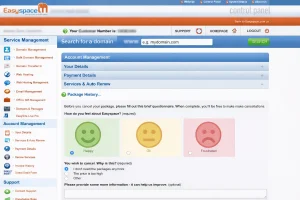
After all the confusion and hidden processes, I finally managed to cancel my subscription, but it wasn’t easy. I had to:
- Manually disable auto-renewal for both hosting and domain.
- Navigate through the control panel to find individual service settings.
- Select “Cancel Individual Items” and confirm each one.
- Contact support with my customer number to verify that everything had been processed.
- Follow up a week later because I didn’t receive confirmation.
Even then, I logged in two more times just to make sure no services were active. The entire process could have been streamlined, but it wasn’t.
Conclusion – My Honest Take on Cancelling EasySpace
Looking back, I wish I had known how complicated this would be before signing up. What should have been a five-minute task turned into a week of back-and-forth emails, unclear instructions, and digging through settings.
EasySpace made it far harder than it needed to be, and frankly, I wouldn’t recommend them to anyone looking for flexibility and transparency. There are better, more user-friendly hosting providers out there.
My advice? If you’re thinking about cancelling, start early, be thorough, and triple-check everything.
