
How Do I Delete My LCN Account?

When I decided to delete my LCN account, I assumed it would be a quick and simple task. But it turned out to be a bit more complicated than I expected. I had to cancel every active service, navigate a not-so-intuitive control panel, and go through their support team to get it done.
If you’re thinking of doing the same, here’s exactly how I managed to delete my LCN account, and everything I wish I’d known beforehand.
Here’s a quick summary of the process:
- Cancel all active services (hosting, domains, email)
- Turn off auto-renewals
- Raise a support ticket or call 0345 363 3637
- Complete identity verification
- Wait for confirmation and delete Direct Debit
Let’s walk through it step by step.
What Is an LCN Account, and Why Might You Want to Delete It?
LCN is a UK-based web hosting and domain provider offering services such as email, SSL certificates, and website hosting.
While they cater to both beginners and small businesses, many users, myself included, reach a point where switching providers becomes necessary.
Some of the most common reasons people choose to delete their LCN accounts include:
- Frustration with auto-renewals and lack of clarity
- Poor response times from customer support
- Overpriced packages compared to market competitors
- Technical complications with hosting, DNS, or email setup
- Business closure or domain project expiry
For instance, one Trustpilot user shared:
Jakub (GB) – 1/5 – Dec 13, 2025:
“Every year, I face issues when renewing and implementing SSL certificates with LCN… teams handling this lack accountability… repeatedly left chasing them.”
If you’re still unsure, check out the full review of LCN highlighting its pros, cons, and real user stories.
Why Can’t Users Close Their LCN Account Immediately?
LCN doesn’t let you delete your account on demand, not while you still have active services attached to it. Even turning off auto-renew isn’t enough. If a domain, hosting plan, or SSL certificate is still active, even if unused, your request will be denied.
This requirement is understandably frustrating, especially if you’ve already decided to move on.
Active vs Expired Services – What Counts?
| Service | Blocks Deletion If Active | How to Expire It |
|---|---|---|
| Domain Names | Yes | Cancel renewal, wait for expiry |
| Web Hosting | Yes | Cancel manually, contact support |
| Monthly Hosting Packages | Yes | Must contact support to cancel |
| Email Hosting | Yes | Disable and let it expire |
| SSL Certificates | Yes | Remove or wait for expiry |
To check these, log into your LCN Online Control Panel and navigate to the Billing > All Renewals section.
How Frustrating Is Cancelling Your LCN Hosting?
For many users, cancelling LCN services, especially hosting, is where the real trouble begins. The process is not consistent across all plans. Yearly packages can be cancelled via the control panel, but monthly plans require contacting support directly.
One reviewer expressed their frustration clearly:
Joe Borgia (GB) – 2⭐ – Dec 6, 2025:
“LCN support used to be good… now they just want to get off the phone. Eventually fixed it myself.”
LCN’s interface, though improved, still lacks clarity. Here’s how to navigate it.
Cancelling Services Inside the Control Panel
To cancel a yearly hosting or domain plan:
- Log in to your LCN Online Control Panel.
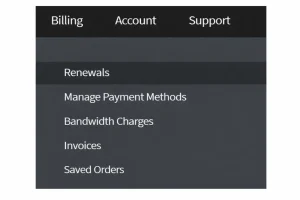
- Hover over Billing, then select Renewals.
- Go to All Renewals to see your services.
- Flick the Auto-Renew switch to OFF for each one.
- Confirm the action when prompted.
For monthly packages, the system won’t allow cancellation. You’ll need to:
- Call LCN at 0345 363 3637, or
- Raise a support ticket and request manual cancellation.
This inconsistency adds unnecessary friction to the process.
How Can You Raise a Support Ticket or Call LCN to Request Account Deletion?
Once you’ve ensured that no services are active, you can finally submit your account deletion request. LCN offers two ways:
| Method | Contact Point |
|---|---|
| Phone Call | 0345 363 3637 |
| Online Ticket | Through your LCN Control Panel |
Before your request is accepted, you must pass security verification.
This includes:
- Your memorable word (set in account security settings)
- Your date of birth
- A line from your registered address
One thing to note is the delay in responses, especially during holidays.
This was echoed in a user review:
Ryan McL (GB) – 1⭐ – Dec 28, 2025:
“They suspended all my services on Christmas Day… it took over 3 days to respond to an urgent support ticket.”
Expect delays and always keep a record of your communication.
What Happens If You Just Let Your LCN Services Expire?
Some users choose not to formally cancel their LCN services, instead allowing them to expire naturally in the hope that this will lead to account closure.
While this approach can work, it is not automatic and requires additional action to fully close the account.
When services expire:
- LCN will stop charging for the expired services.
- You must still submit a manual account deletion request.
- Support will verify that all services are inactive before proceeding.
- You should cancel your Direct Debit directly with your bank to avoid unwanted charges.
It’s important to note that closure confirmation is not always guaranteed. Some users report needing to follow up with support to ensure their account was fully deleted and no further billing issues occurred.
How I Successfully Deleted My LCN Account?
Closing my LCN account required patience and careful attention to each step. While the process is not instant, it can be completed smoothly if you follow the correct order and stay proactive with support.
Step-by-Step Process I Followed:
- Reviewed active services: Logged into the control panel and checked the Billing section to identify everything still active.
- Cancelled renewals and hosting: Switched off domain auto-renewals and contacted support to manually cancel my monthly hosting.
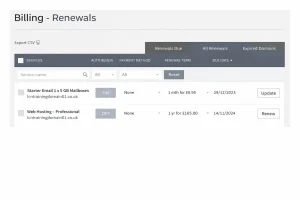
- Waited for services to expire: Monitored the account until all services showed as expired before requesting deletion.
- Submitted deletion request: Raised a support ticket, provided verification details, and followed up twice, including a phone call.
- Cancelled Direct Debit: Removed the bank mandate and saved confirmation screenshots for proof.
Overall, the entire process took just over 10 days, including waiting periods and support responses.
My Honest Opinion on LCN After Closing My Account
I used LCN for over three years and initially found them reliable. But things changed over time. The customer service slowed down, technical issues became more frequent, and billing practices felt aggressive.
Would I Recommend LCN?
Honestly, no. The lack of a refund policy, sluggish support, and convoluted cancellation process make it hard to trust them with mission-critical services. While their new control panel is a welcome update, it doesn’t fix the deeper issues.
If you’re thinking of deleting your LCN account, my advice is to stay proactive:
- Cancel services manually
- Follow up consistently
- Save evidence
- Monitor for post-closure charges
And if you’re considering a new provider, take your time to compare features, uptime, and transparency.
